جدول المحتويات
Automatic Manufacturing Model
Automated manufacturing model is used to create templates for materials for which we want to include automatic manufacturing in automatic manufacturing invoices directly when the invoices are stored.
To access the automatic manufacturing model from the General - templates - Auto Manufacturing menu
To create a new template we go to the New button
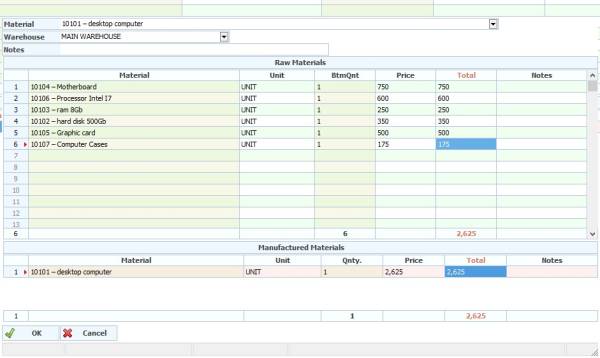
The following window will appears as in the picture:
Note: If some fields do not appear to you, you can use the right mouse button and click on the table properties anywhere in the invoice table to show or hide the columns.
In the Material field: we select the item.
Warehouse field: Leave it blank if you want to use the invoice warehouse when selling.
Notes field: form notes.
From the raw materials table, add the raw materials needed to manufacture the material you chose above.
Manufactured materials: The material you have selected will appear here above. To create a model for it, set the standard price for the material cost. Note: The program will automatically calculate the difference from the cost and record it in calculating the manufacturing variances when storing the sales invoice.