جدول المحتويات
Users
From the list of Data Syncs - CS POS - Cards - Users.
Through the user card, we add password and options to users at points of sale
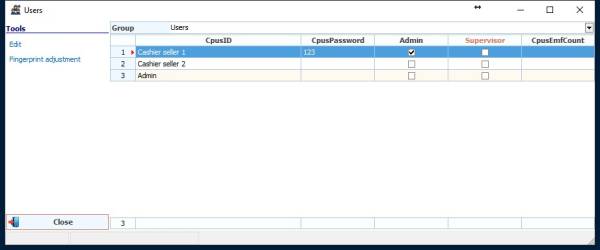
We choose the group of users that we have added from the accounts group (accounting - cards - account groups)
We specify the accounts of cashier users, and the account must be (dealer)

We choose the user and press
Edit

Password: We set a password for the user
Category: We define the user category that we have added from Users Categories
https://cserp.info/wiki/en/help/cposrules
Default Muniment: We specify the user's default muniment (sale - purchase - sales return - purchase return)
Language: We specify the default language for the user as follows: (AR - EN - TR)
Discount % : To give a discount percentage to the user at the level of the bill (the discount percentage cannot be exceeded by the user)
The options are below
Admin: To give admin prerogatives to the user
Supervisor: To determine the powers of the supervisor and take the powers of his category
Allow Exit: To allow the user to exit the POS screen
Left-Handed: If the user is left-handed
Fingerprint adjustment
Adding or modifying user fingerprints in order to log in to users by fingerprint instead of the password
