جدول المحتويات
Program options
We access these options through the File - Tools - Options menu
The program options contain several tabs.
Local options:
Working folder: the path for storing program options on the main machine, also the documentation files known as log and others, and they are inside a default folder called cs
Identification number: A number for the computer on which the program is installed, which is usually used with specific licenses for the program to authenticate the license.
Local options: - File
Automatically open last file - Play the last played data file automatically when you open the program. Refinement mode: used by the program manager to monitor performance or for some maintenance purpose. Ignore data issuance: This option is chosen if you want to open the program without rebuilding if requested .. It is not recommended to use this option for non-advanced users.
Local options: - Terminals
Used to connect devices connected to the program at the computer level.
Local options: - Server
Protection server: the address of the protection server on which the license is located, leave it blank in the case of the protection circuit on the same computer. If the license is of a rental type, enter the domain address of the rental copy.
Password: the security server password that was set when creating the license security file. If the license is of a rental type, enter the license password for the rental copy.
User Options:
User Options: Archive
Temporary files: The path for temporary files that you modify from archive attachments, account attachments, or image attachments for material.
Show Document Tree: To show or hide the document tree in the form of a tree or a directory of archives at the program level.
User Options: Attachments
Image path: to specify the path for images of materials or accounts in the program. It is sufficient to name the image, such as the icon of the material or account, and place it in a folder on the computer from which the program is opened, in order for the image to be read with the designs or the image display screen of the program from this path to the required material. Important note: Initial reading the image for this path, that is, if there is an image in the database attachments and the path for the pictures folder has been renewed with the options, the image will be read from the pictures folder with the options, and if the image is not found, the program will automatically search for the database attachments.
User Options: Search
Time delay: Time is measured in thousandths of a second, for example, a second = 1000 The default search value is 200ms. This option has been developed in consideration of the different user performance using the keyboard and search. If you do not want the results to appear quickly in the program, please enlarge the time delay value, noting that the search in the program begins after entering the third character in the drop down tables.
User Options: Warnings
In order to choose whether the warning messages appear in the program. For example, a confirmation message to close the program.
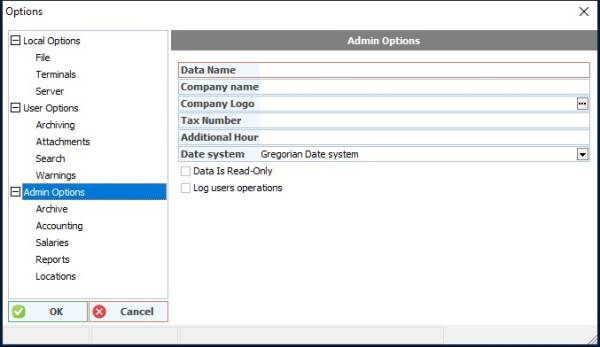
Admin Options
Data name: The default data name that will appear on the opening files screen
Company name: The facility name, the accounting file name, or the fiscal year that will appear in the report cells.
Company Logo: The company logo image path, which has a special cell for report designs at the program level.
Tax number: a cell for the facility's tax number, if any. To be used for reporting.
Additional hours: to determine the number of working hours after 12 am to calculate the operations stored during this period from the date of the day Previous work before 12 in the morning. Date system: to choose the date system in the program between Gregorian or Hijri.
Read-only data option: Lock the storage of all program documents. Typically used when fiscal year reviews close and expire after rolling out a new file.
The option to record user operations: high and additional documentation of all user operations at the level of all program entries. Example: storing the reports requested by each user during the session with the filters used for this report.
Admin Options: Archive
Do not allow descriptors to be added: Prevent adding descriptors to the archive.
Admin's Options: Accounting
To enter number formats in the program: #, ### 0. ##; (#, ### 0. ##); "" " () In parentheses for credit values . Comma between numbers to display the thousand, for example , Comma decimal numbers The value shown for the blank value in the reports. For example, if "zero" is placed, the word zero will appear instead of the empty in reports. # Each one represents a number
Admin's Options: Salaries
Calculation start: The date on which salaries are calculated in the program. The date is usually modified when rotating the data, so that salaries are calculated from the date of the beginning of the fiscal year and the date of employee contracts is ignored
Admin Options: Reports
Special reports option for each user: used to sort the reports at the user level.
Admin Options: Locations
Virtual location: Define the longitude and latitude of the facility to be used in adding maps and in program reports. Map: Determine the type of map used by adding maps and locating sites to the program. Google API: To register a license to use Google apps.