جدول المحتويات
Account ledger
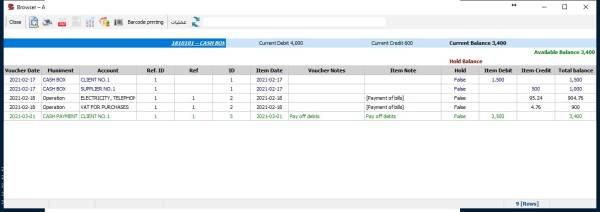
The account ledger is one of the accounting books that shows the account balances after the bonds are posted, the entries from the journal to it and it is possible to display the report for an account or several accounts or request a ledger report according to the region, which is specified from the account card
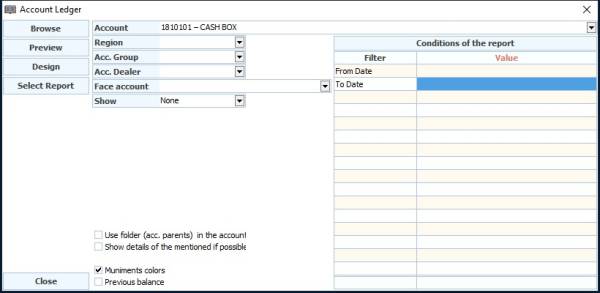
Includes Report Request window
Account : the name of the account to be reported,if it is left blank, all accounts will appear
Region : Filter the report by region (the region is defined on the account card
Account group : A report for a group of accounts that you have created from account groups
Account Dealer: Filter on dealer basis
Face Account : Filter based on the corresponding account
Show : Available or Hold
Options Below
Use folder (acc. parents) in the accounts summary : grouping the accounts in the book (the account of accounts) in the summary
Show details of the mentioned if possible : Show the accounts corresponding to the account requested in the report in the voucher if there is more than one account
Muniments colors : Show the movement of documents in color according to the color of each document, which was previously determined by the document's properties
Previous balance : If there was liquidation from a certain date