
Table of Contents
Archive descriptors card
Descriptors: It is the set of attributes for the document, which was left for you to add to what suits your business and your needs instead of the program imposing on you descriptors that you do not need, and descriptors such as "date of birth, age, address, … etc."
Suppose an example of a hospital that wants to archive its employees' data, for example.
The first thing we do is define common and non-common descriptors for all types of documents, and the documents can be "personal information, education information, job information, contact information … etc."
As a quick definition of the document, it is : The paper or the workbook that contains the information (descriptors) to be archived.
To add descriptors, go to the archiving menu - Cards - Archive Descriptors Card - click on the New button to add a descriptor, and in the Name field type the name of the descriptor you want to add
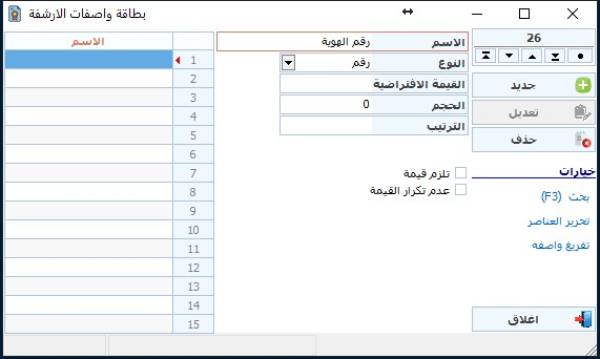
The Descriptors Card screen contains several fields, which are
Type : The type must be specified for the descriptor and there are several types, namely:
Text: For the contents of the descriptor to be text containing letters, numbers and symbols
Logical: It is only two options "yes or no"
Number: so that the contents of the descriptor are numbers only
Date: The contents of the descriptor are a date
List: is a selection from several custom options that have been predefined
Default value: It is content that we want to appear permanently as soon as this attribute is added, either to add to it or to modify it if it is used frequently.
Size: To determine the size of the text or numbers inside this description, such as the ID card, which consists of 10 numbers, for example, and we want to limit the size to 10 only
Empty not allow: A descriptor is not stored if no value is entered for it.
Duplicate value not allow: To prevent duplication of the same value for this descriptor in the database, and it is usually used with an ID number, for example.
