
en:help:arcstagescard
Table of Contents
Stages
They are the stages or (sections) that the document passes through from one department to another in order for the responsible employee in this department to follow up the document that is included in the workflow.
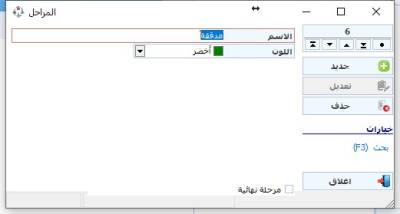
To access the Stage Card
Workflow - Cards - Stages
To add a new stage, click on the New button and then write the stage name and specify the color (this stage will appear in documents workflow for users with the specified color to distinguish it)
At the bottom of the screen there is an option "Final stage" when setting this option, so the stage the document passes through is considered the last stage and is stopped at the end.
en/help/arcstagescard.txt · Last modified: 2021/04/23 03:10
