
Table of Contents
Invoices descriptors card
It is information that we link to the invoices, such as linking the cash invoice to the name, number and address of the customer after storing it.
To access the invoices descriptions through
Stock - Cards - Invoices descriptors card
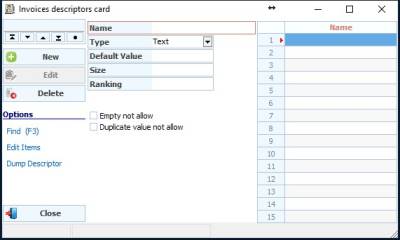
To add a descriptor, we click on New
Name: the name of the descriptor, for example, the customer number
Type: the type of the descriptor (text, number, phone, date …)
Default Value: the value in which the descriptor will appear if it is a fixed value, and it can be modified when recording the description information
Size: The number of letters or numbers in a descriptor, such as a customer's national ID number, is usually a fixed number
Ranking: arranging the descriptor with the rest of the descriptors
The options are below
Empty not allow: not to save without recording a value for the description
Duplicate value not allow: not to repeat the value recorded in the description with a previous value
To assign descriptors to invoice with an invoice muniment, we must first create a set of descriptors to link to the muniment
