
Table of Contents
Data Syncs ( Mat. Groups )
From the list of Data Syncs - CS POS - Cards - materials groups.
Through this window, we create groups of materials to display on the point of sale (POS) screen, materials printers, or for offers.
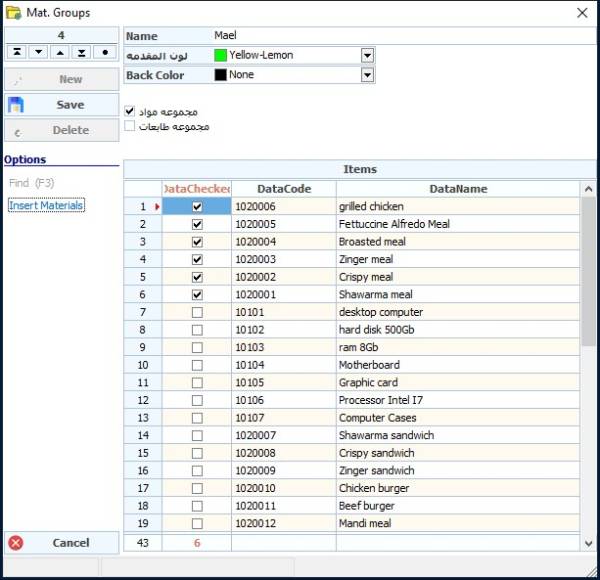
We press the New button
Name: The name of the group to be added
Foreground Color :
Background Color : Determines the color of the group on the POS screen
Materials Group option: Select this group to appear on the POS screen.
Printers Group Option: Select this group to appear in Material Printers.
Note: If you do not choose these options, the group will only appear on the offers card.
Then we select the materials to be included in this group from the Insert material tab.
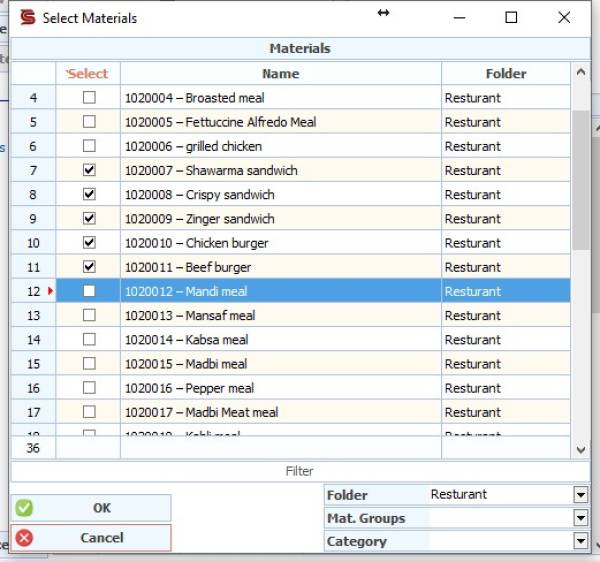
We can choose the materials individually or by specifying a folder, materials group, or category.
