
en:help:designformulaform
Table of Contents
Equation window
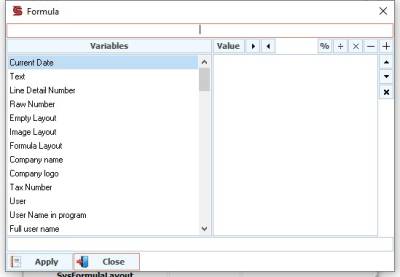
The equation window is divided into two parts The first section Variables : The basic elements through which we want to create the equation, as there is a search box through which we search for the required field to add it to the equation.
Section Two - Elements and Values of the Equation __
Where we add the elements of the equation from variables or a value that we enter and perform mathematical operations inside them, the two arrows in the form of a triangle next to the value button are to open and close the parentheses in the equation.
en/help/designformulaform.txt · Last modified: 2021/04/23 03:09
