Table of Contents
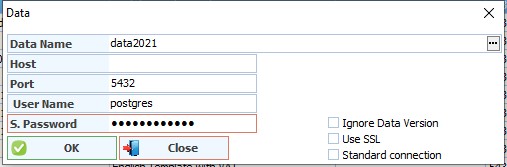
Add database
Data name: To literally enter the database name like what is in the postgres database, and it must be in English letters and without commas or symbols or a space
Server address: Leave it blank if you use the program from the same computer on which the database is located, to automatically take the address 127.0.0.1, or type the server address on which the database is located in case the database is on another machine.
Port: through which we specify the database port "the default port 5432"
Username: Database username
Password: The database password that was specified when installing the database.
Ignore issuing data: It is used for some maintenance matters. Do not make this choice if it is not needed.
Use SSL: Use this option only if an SSL encrypted connection is established.
Standard connection: Use the traditional database connection. Leave it blank if it is not needed.