
Table of Contents
Printing options
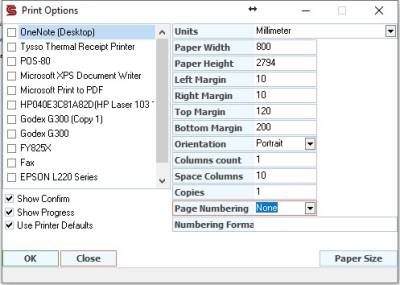
Units: To specify the unit of measurement
Page width: Specifies the width of the page
Page Height: Specifies the height of the page
Left margin: To specify the left margin of the page
Right margin: To specify the right margin for the page
Top margin: Specifies the top margin for the page
Bottom margin: to specify the bottom margin for the page
Print orientation: To specify the orientation of the print portrait or landscape
Number of columns: To determine the number of columns per page, it is used for sample reports only.
Column separator: Column separator if number of columns is used.
Number of copies: To determine the number of copies during printing
Page numbering: To choose whether the page numbering appears and where the page numbering appears
Page numbering text: Through it, we write the formatting and display style of numbering, bearing in mind that if it is left blank, page numbers will not appear when printing. Note that page numbers appear only when printing and not when previewing
% 1 = to show the page number
% 4 = to show the number of pages
Examples
To show the format Page 5 of 22 On the page we write the following with the page numbering text:
`` Page% 1 of% 4
``% 1 /% 4
'{% 1}' '= {5}
Show the confirmation screen before printing: To show us a confirmation screen when printing
Show printing progress: Show or hide the printing process window
Adopting the default printer options: To make the printing options depend on the default printer that we have selected from Windows as the default printer. (Some problems with printers with Windows may be addressed when choosing)
Page Size: Specifies the paper size
